One file. The whole pack.
Full Hearts builds you a single modpack file. Import it into a launcher and every mod installs at once, already checked to work together. No clicking through each page.
One-click modpack (.mrpack)
- 1
Get a launcher that reads .mrpack
Use the Modrinth App, Prism Launcher, or ATLauncher (all free).
- 2
Download your modpack
On your collections or results page, click “Download as modpack (.mrpack)”. You get one small file.
- 3
Import it and play
In your launcher choose Add instance → From file (or just drag the
.mrpackin). It downloads and installs every mod for you. Launch and play.The file lands in your Downloads folder — don't double-click it. Import it from inside the launcher using the step above.
Works for Fabric, Quilt, Forge & NeoForge loadouts. Modrinth-hosted mods only.
Prefer a Modrinth collection?
You can also build a Modrinth collection and pull it down with a community tool. Slower, but works on any loader.
- 1
Log into Modrinth
Open modrinth.com and sign in (or create a free account). Collections are saved to your account.
- 2
Click “Publish”
On Modrinth, open the Publish menu in the top-right.

- 3
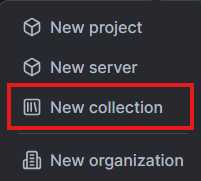
Create a collection
Choose Create a collection and name it whatever you like.
- 4
Open all your mods & add them
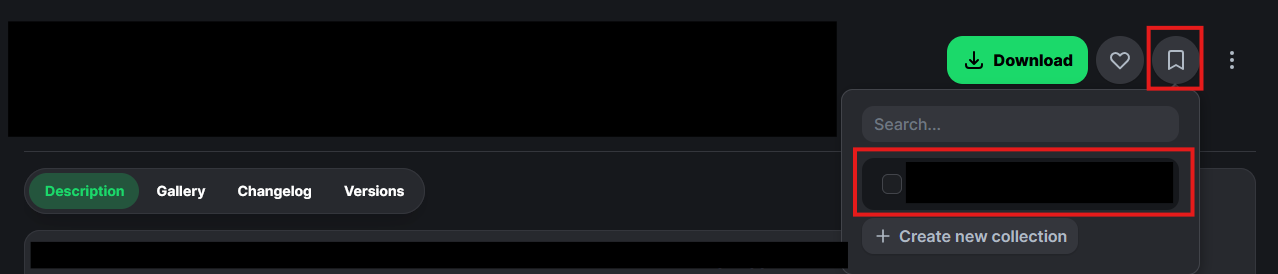
Back on your collection (or results) page, hit “Open all mod pages”. Every mod opens in its own tab. On each Modrinth tab, click + and add it to the collection you just made.
- 5
Auto-download with the collection downloader
Download the Modrinth Collection Downloader from GitHub and run the
.exe. Paste your collection ID (it's in the collection's URL), and it downloads every mod automatically into amodsfolder next to the exe. Drag thatmodsfolder into your Minecraft directory and launch. Done!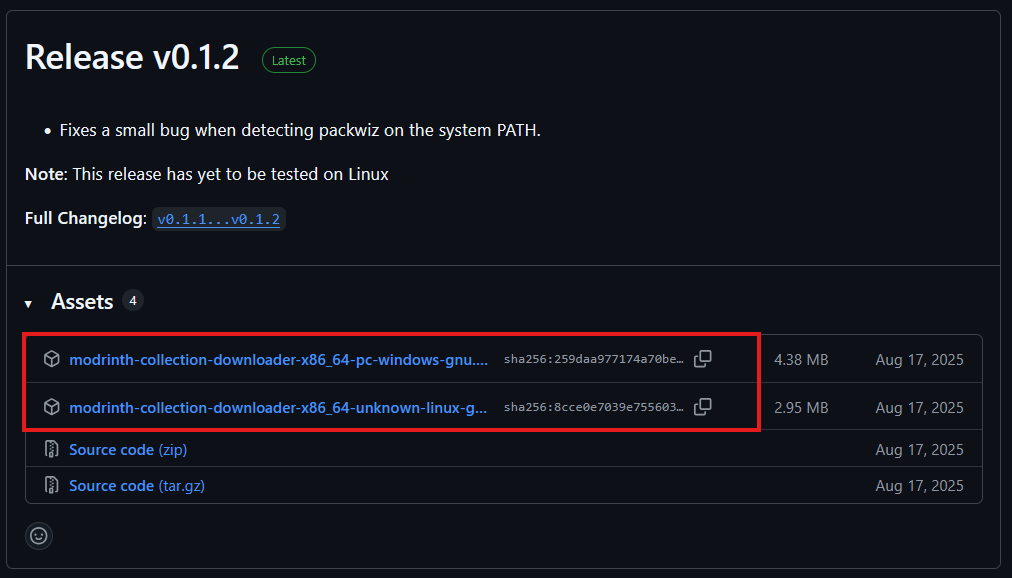
The downloader is a third-party open-source tool. Always review what you run, and only download mods from official sources.
What you need
- Minecraft: Java Edition. Mods only work on Java, not Bedrock (the phone, console, and Windows 10/11 Store version). If you can install Forge or Fabric, you have Java.
- A launcher that reads
.mrpack. The Modrinth App, Prism Launcher, or ATLauncher. All are free and install the correct Java runtime and mod loader for you, which is the part people usually get wrong by hand. - A little RAM headroom. A small pack runs fine on 4 GB; heavier packs are happier with 6 to 8 GB. You set this in the launcher's instance settings, not in the game.
When something won't launch
Most modded crashes come down to a mismatch: the loader, the version, or a missing dependency. Here are the ones that come up most, and why the one-click .mrpack avoids them.
“The game crashed” or a missing-dependency error on startup
A mod almost always needs one or more library mods to run (Fabric API, Architectury, GeckoLib, and so on). Miss one and the game closes with a log most players can't read. The .mrpack Full Hearts builds already includes the full dependency chain for every mod, resolved for your exact loader and version, so this is the single biggest reason to use the one-click route over adding jars by hand.
A mod says it requires a different Minecraft version
Every mod in a pack has to be built for the same game version and the same loader. A Forge 1.20.1 jar will not load on Fabric, and a 1.21 jar will not load on 1.20.1. Full Hearts resolves each mod to a concrete build for the version and loader you chose and drops anything that has no matching file, so a pack you export here is already version-consistent.
Some mods are missing from my pack
If a mod has no stable build for your loader and version, or a required dependency of it doesn't, it gets left out rather than shipped in a pack that won't start. The results screen lists exactly what was excluded and why. Switching to a version with wider support (1.20.1 and 1.21.1 are the safest right now) usually brings the missing mods back.
It works in single-player but not when I join a server
A server needs the same version of every mod that adds content or networking. Client only mods like a minimap or an inventory search such as JEI belong on your client and should stay off the server, and forcing them there causes a mismatch. Build the server's mod set from the same loadout so the shared mods line up exactly.
Is this safe to run?
The mods download from Modrinth's own CDN, and the jars stay the work and property of their authors. Full Hearts never bundles or re-hosts mod files. Whatever route you take, only download mods from official sources like Modrinth or CurseForge, and treat any tool that asks you to run an .exe with the usual care.
Putting the pack on a server
To play with friends, the shared mods have to match on both sides. The clean way is to build the server's set from the same loadout you play on, so every content mod is the identical version client and server. Keep purely client-side mods (minimaps, JEI, shaders) off the server, and add server-only tools (permissions, a web map, chat filters) separately. If a specific mod refuses to load on the server, tell me which one on the Contact page and it gets checked against the catalogue.